
Leap Motion Alternatives in 2026: 5 Options Compared
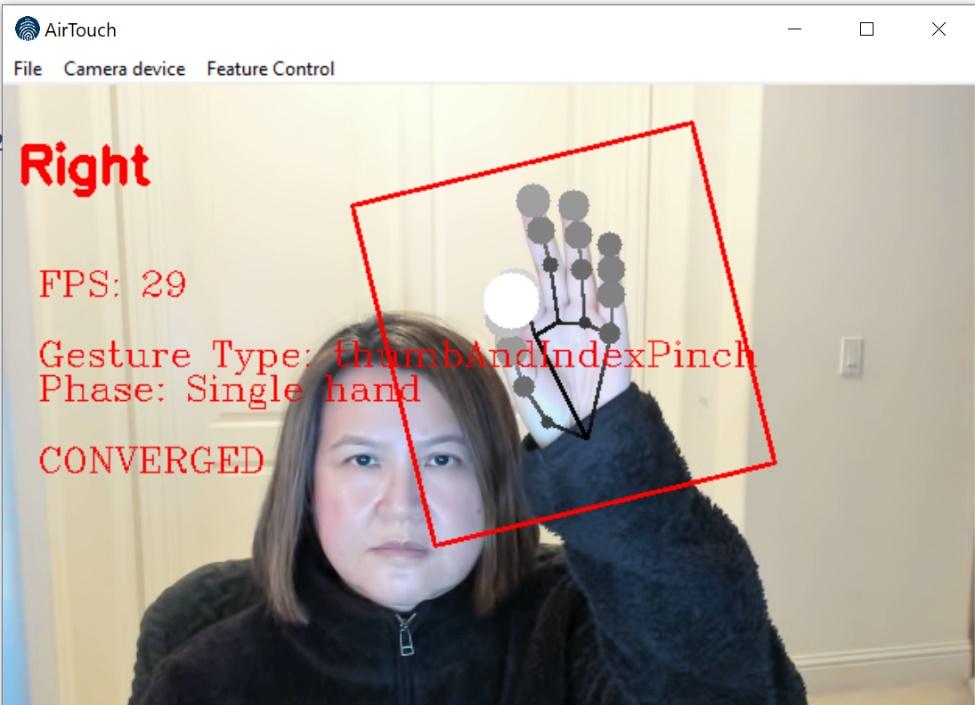
Here is the short answer. The best Leap Motion alternative depends on what you used it for. For touchless control of a PC, kiosk, or display, AirTouch does the job with a standard RGB camera and no SDK. For custom development on raw hand data, MediaPipe is free. For depth data, look at Orbbec or Intel RealSense cameras. For XR, the hand tracking built into current headsets has largely replaced an add-on sensor. For control with no camera at all, there are gesture wristbands.
What happened to Leap Motion?
Leap Motion was founded in 2010 and shipped its first controller in 2013, a small USB sensor that tracked hands above a desk with remarkable precision. Ultrahaptics acquired the company in 2019 and the combined business became Ultraleap. In June 2024, Ultraleap announced a major restructuring and said it would seek a buyer for the hand tracking business. In 2025, music technology company ROLI announced that Ultraleap was joining it, with a stated focus on gesture technology for music learning and creation.
The Leap Motion Controller 2 can still be found at resellers at the time of writing. The open question for anyone building a kiosk, exhibit, or clinical workflow is roadmap. When the new owner's focus is music, teams with multi-year deployments are reasonable to evaluate alternatives. Our detailed comparison is in AirTouch vs Ultraleap.
1. AirTouch: touchless control with a standard camera
AirTouch is patented gesture control and hand tracking software that turns a standard RGB camera into a touchless interface. Gestures become mouse, keyboard, and touch input, so existing applications work with no code changes. It runs on Windows, Linux, and Android, with macOS on the way.
Best for: kiosks, digital signage, conference rooms, medical imaging, and anyone who used Leap Motion to control existing software.
Sensor range: limited by the camera, not the software. With a suitable camera it works at 20 feet and beyond, compared with the desk-scale zone of a Leap sensor.
Sterile and soiled environments: trained for gloved hands, including surgical glove colors, and tracks through glass.
Hardware choice: it starts on any RGB camera. Through our partnership with Orbbec, it also takes advantage of 3D depth sensing and IR cameras when a deployment calls for them. See the Orbbec page.
Tradeoff: it outputs input events, not a finger skeleton. If your application consumed Leap's joint data directly, keep reading.
2. MediaPipe: free hand landmarks for developers
Google's open source MediaPipe returns 21 landmarks per hand from an ordinary camera. It is the closest free replacement for Leap's raw data, with less precision at the fingertip and no infrared. You build everything above the landmarks yourself. We compare the two approaches in MediaPipe hand tracking: build it or buy it.
Best for: research, creative coding, and custom apps that need joint positions.
Tradeoff: no intent detection, no cursor, no OS input. It is a component, not a product.
3. Depth cameras: Orbbec and Intel RealSense
If you chose Leap Motion because infrared tracking works in dark rooms, a depth camera keeps that advantage at room scale. These are sensors, so you still need hand tracking software on top. AirTouch supports Orbbec cameras for exactly this case. Background reading: AirTouch vs Intel RealSense and Azure Kinect is discontinued: what now.
Best for: dark exhibits, precision spatial work, and body tracking.
Tradeoff: added hardware cost, plus software to choose or write.
4. Built-in headset hand tracking
Leap Motion spent years strapped to the front of VR headsets. Current headsets from Meta and Apple track hands natively, which is a large part of why the add-on market shrank. If your project lives inside a headset, use what ships with it.
Best for: XR applications. This is where a headset wins outright.
Tradeoff: everyone needs a headset. For shared screens, see gesture control without a VR headset.
5. Gesture wristbands
Wrist-worn devices read muscle or motion signals and work with no camera and no line of sight. They suit a single committed user more than a public screen. The field is covered in gesture wristbands vs camera control.
Best for: personal, mobile, and out-of-view control.
Tradeoff: something to wear, charge, and hand to each user.
Which Leap Motion alternative should you choose?
You used Leap Motion for | Consider |
|---|---|
Touchless kiosks, signage, or exhibits | AirTouch |
Controlling existing desktop software | AirTouch |
Medical imaging or gloved environments | AirTouch |
Dark rooms or precision spatial work | AirTouch with an Orbbec camera |
Raw finger joint data in your own code | MediaPipe, or stay with Leap Motion |
VR and AR headsets | The headset's native tracking |
Control with no camera in view | A gesture wristband |
Where does Leap Motion still win?
Fingertip precision at close range. For fine finger work within a couple of feet of the sensor, such as virtual instruments or detailed hand research, the Leap Motion Controller 2 remains a strong device. That is also the direction its new owner is taking it.
Where to start
Start a free trial and run AirTouch next to your Leap setup on the same PC. Product teams replacing an embedded Leap sensor can book a demo to talk through OEM licensing.
Related: best gesture control software, best touchless kiosk software, best cameras for hand tracking, and gesture control and hand tracking software.
© 2026 Neural Lab, Inc.
Designed and built in Sunnyvale, CA